


Tracking Ovulation After Pregnancy Loss: What To Expect
This guide walks through the practical steps of resuming cycle tracking after a pregnancy loss at your own pace. It provides clear instructions on logging Cycle Day 1 based on your recovery method, managing your Tempdrop app settings, and understanding what to expect from your basal body temperature (BBT) and cervical mucus as your hormonal baseline resets.




Updated September 4, 2026

Experiencing a pregnancy loss is heartbreaking, and navigating the physical recovery alongside the emotional grief can feel overwhelming. Please know there is no "right" way to feel, and no rush to resume any routine.
If and when you feel ready to continue charting your basal body temperature (BBT), Tempdrop is here to support you. Charting after a miscarriage isn't about rushing back to a schedule; it’s simply a quiet, grounded tool to help you understand how your body is healing and when your natural hormone patterns begin to return.
When Should I Start A New Cycle After A Loss?
Knowing when to start a new cycle on your chart depends slightly on how your pregnancy loss was managed. Here is how to handle your chart during recovery:
1. Natural Loss or Medication-Managed Recovery
The first day of full menstrual-like bleeding should be entered as Cycle Day 1. If you experience spotting before the bleeding becomes full flow, this should be recorded on your existing cycle, rather than starting a new one.
If you take medication to manage your pregnancy loss, we recommend making a note in the app using the notes feature on the days you take the medication. This can provide helpful context when reviewing your chart later.
2. Surgical Procedure (D&C or D&E)
If your care included a surgical procedure such as a D&C (Dilation and Curettage) or D&E, we recommend marking the day of your procedure as Cycle Day 1. This allows the Tempdrop algorithm to track your recovery accurately from the point of clinical completion. You may also find it helpful to make a note in the app with the date of your procedure for future reference.
How Do I End Pregnancy Mode In The Tempdrop App?
When you enter your first day of full bleeding and toggle Cycle Day 1, the app will prompt you to end Pregnancy Mode in the app settings.
Once you select your intended mode (Cycle Tracking or Get Pregnant), you'll be asked to choose a reason for ending the pregnancy.
Please select Pregnancy Loss.
Enter the date you experienced full-flow bleeding or the date of your surgical procedure.
What To Expect From Your Basal Body Temperature & Cycle Recovery
It’s completely normal for your cycles to be a little different in the weeks or months following a pregnancy loss, regardless of the stage of pregnancy.
Your body has been through a major hormonal transition, and human chorionic gonadotropin (hCG) and progesterone need time to gently settle back to baseline.
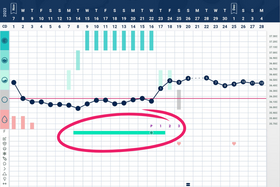
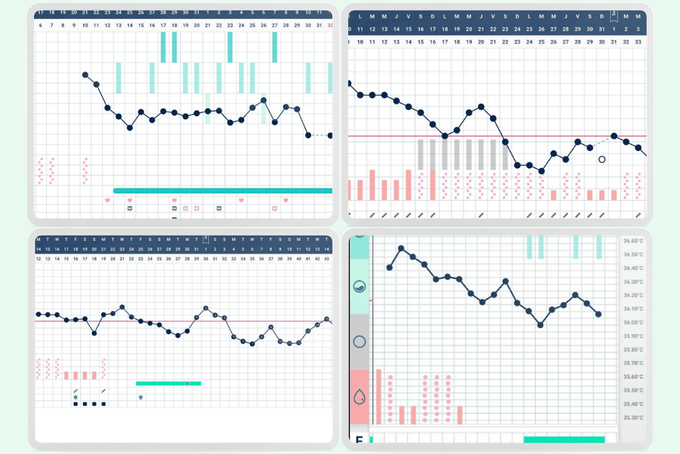
During this reset phase, your BBT chart may reflect:
- Longer or shorter cycles than usual
- Delayed ovulation
- Anovulatory cycles (cycles without ovulation)
- Changes in bleeding patterns
- Irregular cervical mucus patterns
- Temporary changes to your basal body temperature pattern (elevated temperatures)
Everyone’s body recovers at its own pace, so there’s no “right” timeline for your cycle to return to your usual pattern. Some women ovulate within two to four weeks post-loss, while for others it takes several cycles. Charting daily observations simply provides visibility into your body's personal healing rhythm.
Why Has The App Switched To Irregular Postpartum Cycles?
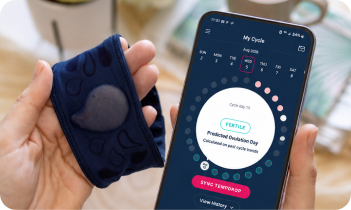
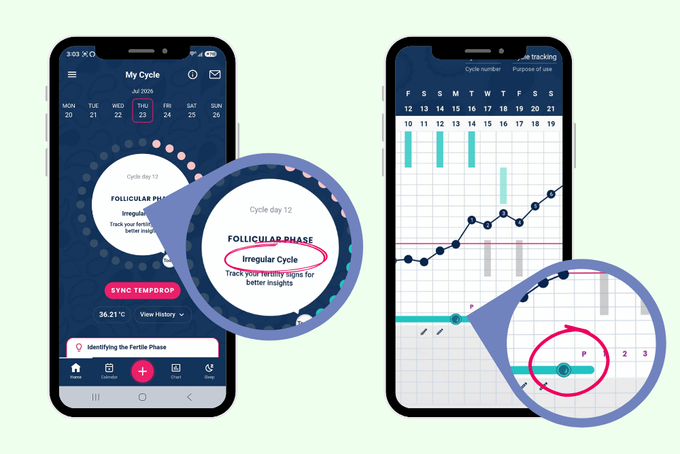
After you record a pregnancy loss, the app will automatically switch to Irregular Postpartum Cycles.
This setting recognises that ovulation can be unpredictable while your hormones return to their baseline. This setting pauses automated cycle predictions to prevent inaccurate fertile window estimates while your body heals. When your cycles become regular again, the app will automatically transition back to regular cycle mode.
What this means for your charting:
- Your data is still being analyzed: Even though future predictions are turned off, Tempdrop continues to process your daily basal body temperature (BBT) and symptom logs.
- Ovulation detection remains active: The app will still identify your fertile window and confirm ovulation once a sustained temperature shift (and cervical mucus peak, if logged) is detected in real time.
Why Can’t I See Cycle Predictions In The App? (Premium Users)
If you are a Premium subscriber, you might notice that future cycle predictions—such as estimated ovulation dates—are temporarily unavailable while your app is in Irregular Postpartum Cycles mode. Please rest assured: your Premium features are still active.
To protect you from inaccurate estimates, Tempdrop does not display predictions. This is because, after a pregnancy loss, it’s simply not possible to reliably predict when ovulation will occur.
How Tempdrop Premium Continues to Track Your Recovery:
- Fertile Window: As you enter your daily observations, the app will identify and open your fertile window based on real-time information.
- Ovulation Verification: Once your Tempdrop sensor detects a sustained basal body temperature (BBT) shift, it will confirm ovulation.
- Symptothermal Cross-Checking: If you have the Cervical Mucus Cross-Check enabled in your app settings, Tempdrop will combine your BBT shift with Peak Day rules to confirm ovulation with maximum accuracy.
- Period Planning: Once ovulation is confirmed, Premium will provide an estimate for when your period is expected.
What Should I Log In The Tempdrop App To Monitor My Recovery After a Pregnancy Loss?
When you're recovering from a pregnancy loss, tracking your cycle shouldn't feel like an added burden. However, continuing to log a few key biological signs (biomarkers) gives you the clearest picture of how your body is healing and when your natural fertility is returning.
For the most accurate interpretation, during cycle recovery, continue recording your daily observations, including:
- Basal body temperature (using your Tempdrop sensor): Your daily resting temperature will give you real-time confirmation when your body officially ovulates again.
- Cervical mucus observations: As estrogen begins to rebuild, cervical mucus acts as your early indicator that your fertile window may be opening, even before a temperature rise occurs.
- Bleeding or spotting: Tracking bleeding patterns helps distinguish post-loss healing from your first true menstrual period.
- Ovulation or pregnancy test results (if you’re using them): If you are using home tests, record them in the app. Tracking home pregnancy tests until you reach a negative result helps confirm hCG has cleared your system, ensuring Ovulation Predictor Kits (OPKs) don't give false positives.
- Custom Notes (such as procedures, medications, or anything else that may affect your chart): This context is invaluable if you review your chart with your healthcare provider later.
Remember: Even if your cycle looks unfamiliar right now, continuing to chart can help you understand how your body is recovering and when ovulation returns.
When Will My Cycle And BBT Charts Return To Normal?
There is no single "right" timeframe for your cycle to return to its baseline after a pregnancy loss. Some women ovulate within 2 to 4 weeks, while for others it may take several weeks or a few cycles for hormonal patterns to fully stabilize.
Your body’s timeline depends on several factors, including how far along the pregnancy was, residual hCG levels, and how your individual body resets
As your hormone patterns stabilise and your cycles become more consistent, the app will automatically recognise this and return to regular cycle mode.
Quick View: Ending Pregnancy Mode
- Wait until your first day of full menstrual-like bleeding.
- Record it as Cycle Day 1.
- The app will prompt you to end Pregnancy Mode.
- Select your intended mode (Cycle Tracking or Get Pregnant).
- Choose Pregnancy Loss as the reason.
- Enter the date your full bleeding began.
Why Is My BBT Still High After A Miscarriage?
Elevated basal body temperature (BBT) is primarily driven by progesterone, but residual human chorionic gonadotropin (hCG) from pregnancy can also keep temperatures higher than your usual pre-ovulatory temperatures. As your body clears residual pregnancy hormones, your BBT will naturally drop. Everyone’s hormonal reset timeline is unique; for some, temperatures settle within two to four weeks, while for others, it may take a few cycles for baseline levels to fully stabilize.
How Do I Tell The Difference Between Post-Loss Bleeding/Spotting And My First True Period?
Post-loss bleeding or spotting is part of your body's initial physical recovery and healing process. Your first true menstrual period occurs only after your body has resumed its hormonal cycle, developed a follicle, and ovulated. To distinguish between the two on your chart, look for the presence of a sustained BBT rise and cervical mucus peak—which confirm ovulation—followed by full-flow bleeding approximately 10 to 14 days after ovulation.
Do I Need A Negative Pregnancy Test Before Tracking Ovulation?
You can begin logging daily biomarkers like BBT and cervical mucus right away without a negative test. However, testing until you achieve a negative pregnancy test is recommended if you plan to use Ovulation Predictor Kits (OPKs). Because residual hCG in your system can cross-react with OPKs and trigger false-positive ovulation results, confirming that hCG has cleared ensures your test results and chart interpretations remain accurate.